Lenovo Legion Laptop: A Powerful Choice for Gaming and Productivity
Introduction to Lenovo Legion Laptop
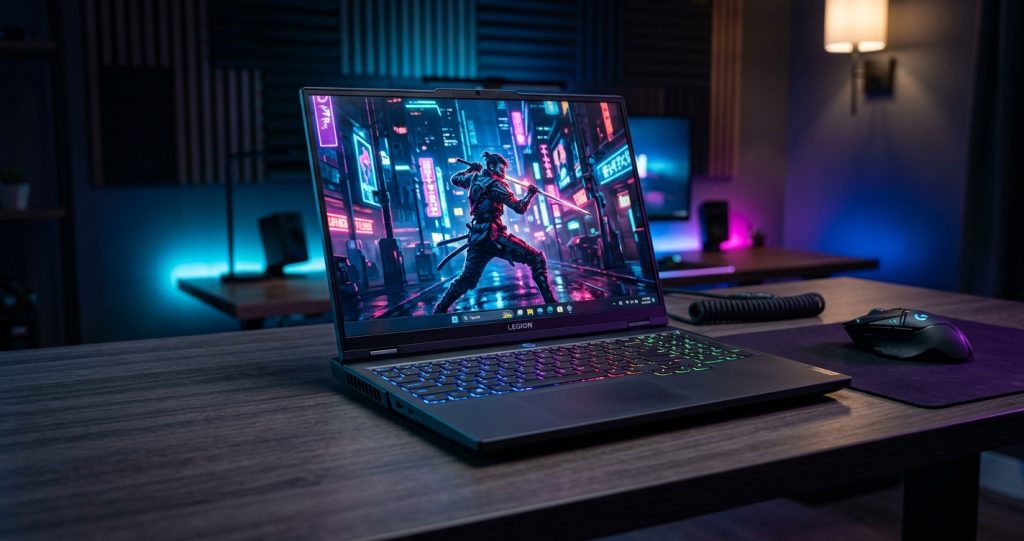
The Lenovo Legion laptop is a popular choice for gamers, students, content creators, and professionals who need powerful performance and reliable hardware. Lenovo’s Legion series is designed to deliver smooth gaming experiences, fast processing, high-quality graphics, and effective cooling. Whether you enjoy playing modern games, editing videos, designing graphics, or multitasking, a Lenovo Legion laptop can be a suitable option for demanding tasks.
With its gaming-focused design, powerful processors, dedicated graphics options, and high-refresh-rate displays on many models, the Lenovo Legion lineup offers features that appeal to users looking for a versatile laptop. Different models come with different specifications, allowing buyers to choose a device that fits their performance needs and budget.
What Is a Lenovo Legion Laptop?
A Lenovo Legion laptop is a performance-oriented laptop developed by Lenovo, a well-known computer manufacturer. The Legion family primarily focuses on gaming, but its powerful hardware can also support professional applications, creative projects, and everyday computing.
Lenovo offers several Legion models, including the Legion Pro series and standard Legion gaming laptops. Specifications vary depending on the model and generation. Some versions feature powerful Intel Core or AMD Ryzen processors, dedicated NVIDIA GeForce RTX graphics, fast SSD storage, and advanced thermal management systems.
These features make Legion laptops useful for people who want more than basic computing performance. They can handle demanding games, productivity software, programming environments, and creative applications when equipped with suitable hardware.
Key Features of Lenovo Legion Laptop
Powerful Processors
One of the main advantages of a Lenovo Legion laptop is its processing power. Depending on the model, users can find Intel Core or AMD Ryzen processors designed to handle demanding workloads.
A capable processor helps games run smoothly, applications respond quickly, and multiple programs operate simultaneously. It is also useful for video editing, software development, 3D modeling, and other processor-intensive tasks.
When choosing a Lenovo Legion laptop, consider the processor generation, number of cores, and overall performance rather than relying only on the processor’s name.
Dedicated Graphics Performance
Graphics performance is especially important for gaming laptops. Many Lenovo Legion models include dedicated NVIDIA GeForce RTX graphics cards, although the exact GPU depends on the configuration.
A dedicated GPU can improve gaming performance, support ray tracing in compatible games, and accelerate certain creative applications. It can also help with rendering, animation, and video production.
If you want to play demanding modern games, check the specific graphics card, its power configuration, and the amount of video memory available. These details can significantly affect performance.
High-Refresh-Rate Display
A quality display can improve both gaming and everyday use. Many Lenovo Legion laptops offer high-refresh-rate screens that make movement appear smoother than on standard 60Hz displays.
Depending on the model, display options may include Full HD, higher-resolution panels, and refresh rates such as 120Hz, 144Hz, 165Hz, or higher.
A high-refresh-rate display can be particularly helpful in competitive games where quick reactions matter. Higher-resolution options may be more suitable for users who prioritize detailed visuals and creative work.
Before buying, compare brightness, resolution, color accuracy, refresh rate, and screen size to find a display that matches your needs.
Lenovo Legion Laptop Design and Build Quality
Lenovo Legion laptops generally combine a gaming-focused appearance with practical construction. Some models have a relatively understated design, while others include more noticeable gaming details.
Their keyboards, touchpads, ports, and chassis layouts are designed to support extended computer use. However, the exact build materials, dimensions, and weight vary between models.
A larger Legion laptop may provide more room for cooling and a bigger display, but it can be less convenient to carry. A more compact configuration may suit students or users who frequently travel between home, school, and work.
If portability matters, check the laptop’s weight, charger size, battery capacity, and overall dimensions before purchasing.
Gaming Performance of Lenovo Legion Laptop
Gaming is the primary focus of the Lenovo Legion family. Models equipped with capable processors and dedicated graphics can run a wide range of games, from popular competitive titles to demanding open-world adventures.
Performance depends on several factors, including the GPU, processor, RAM, cooling system, display resolution, and game settings.
Competitive Gaming
Games that benefit from quick response times can take advantage of high-refresh-rate displays and powerful graphics hardware. A suitable Legion configuration may provide a smooth experience in competitive shooters, racing games, and multiplayer titles.
However, frame rates differ from game to game. Always compare benchmarks for the exact laptop configuration you are considering.
>>>Lenvo Laptop>>>
AAA Gaming
Modern AAA games often require substantial graphics processing power and memory. Lenovo Legion models with stronger RTX graphics options are better suited to demanding titles at higher resolutions or graphical settings.
Features such as ray tracing and advanced upscaling can improve visual quality or performance in supported games. Their benefits depend on the graphics card and the game being played.
For the best results, choose a laptop based on the games you actually play instead of automatically purchasing the most expensive configuration.
Cooling System and Thermal Management
Gaming laptops generate considerable heat when running demanding software. Lenovo Legion models use cooling systems designed to help manage temperatures during extended workloads.
Depending on the model, these systems may include multiple fans, heat pipes, air vents, and dedicated thermal profiles.
Effective cooling helps the processor and graphics card maintain performance under demanding conditions. Fan noise and temperatures can still increase during gaming, rendering, or other intensive activities.
To support proper cooling, use the laptop on a hard, flat surface and keep its air vents clear. Cleaning dust from the cooling system when necessary can also help maintain performance.
Keyboard and User Experience
The keyboard is an important part of a gaming laptop because it affects comfort during gaming, typing, and productivity.
Many Lenovo Legion models feature full-size or gaming-oriented keyboards, with selected configurations offering RGB lighting or customizable lighting effects. Some models also provide a numeric keypad.
Keyboard features vary, so check the layout, key travel, lighting options, and available shortcuts before buying.
A comfortable keyboard can make a Lenovo Legion laptop useful for writing assignments, working on documents, programming, and playing games for extended periods.
RAM and Storage Options
Memory and storage have a major impact on the overall user experience.
RAM for Multitasking
Many Legion configurations offer 16GB or more of RAM, although entry-level and older models may differ. For everyday gaming and multitasking, 16GB can be a practical starting point. More memory may be beneficial for demanding creative software, large projects, and running several applications simultaneously.
Check whether the laptop’s RAM is upgradeable, because some configurations have different memory designs.
Fast SSD Storage
Lenovo Legion laptops commonly use solid-state drives, which provide fast boot times and quick application loading compared with traditional hard drives.
Storage capacity determines how many games, videos, programs, and personal files you can keep installed. A 512GB SSD may be sufficient for lighter use, while a 1TB SSD or larger can provide more room for modern games and creative projects.
If you plan to store large files, investigate the available SSD upgrade options before making your purchase.
Battery Life and Charging
Battery life is an important consideration when choosing any laptop. Lenovo Legion devices prioritize performance, and demanding gaming hardware can consume considerable power.
Battery life varies according to the model, battery capacity, screen brightness, power mode, and applications in use. Lightweight tasks such as browsing and document editing generally consume less power than gaming or video rendering.
For demanding gaming, using the supplied power adapter is often recommended to achieve the laptop’s intended performance. If you regularly work away from a power outlet, compare independent battery-life tests for the exact model.
Lenovo Legion Laptop for Students
A Lenovo Legion laptop can be useful for students who need a computer for both academic work and demanding applications.
It can support online classes, research, presentations, programming, graphic design, and video editing. Students studying computer science, engineering, animation, or multimedia may particularly benefit from the stronger hardware available in selected models.
However, a gaming laptop may be more expensive and heavier than a basic student laptop. Students who mainly use web browsers, word processors, and educational websites may find a less powerful laptop more practical.
Consider your course requirements, portability needs, and budget before choosing a Legion model.
Lenovo Legion Laptop for Content Creators
Content creators can also benefit from the performance of a Lenovo Legion laptop.
Video editors may appreciate its capable processor, dedicated graphics, fast SSD, and memory capacity. Graphic designers can use compatible creative software, while 3D artists may benefit from a supported RTX GPU.
For content creation, pay attention to display color accuracy, RAM capacity, storage space, and software compatibility. These specifications may matter more than gaming-focused features such as RGB keyboard lighting.
If you regularly work with 4K footage or complex projects, consider a higher-performance configuration with sufficient memory and storage.
Connectivity and Ports
A good selection of ports makes it easier to connect external devices. Depending on the model, a Lenovo Legion laptop may include USB-A, USB-C, HDMI, an Ethernet port, an audio jack, and a charging connection.
These ports can support external monitors, gaming accessories, storage drives, headsets, and other peripherals.
Some models also offer modern wireless connectivity for compatible Wi-Fi networks and Bluetooth devices. Port availability and supported standards vary, so review the manufacturer’s specifications before purchasing.
If you plan to connect multiple monitors or specialized equipment, make sure the selected configuration supports your requirements.
Lenovo Legion Laptop Price and Value
The price of a Lenovo Legion laptop depends on its generation, processor, graphics card, RAM, storage, screen specifications, and overall condition.
Entry-level configurations generally cost less, while premium Legion Pro models with powerful GPUs and advanced displays can be considerably more expensive.
Prices can also differ between countries, retailers, and promotional periods. In Pakistan, buyers should compare local availability, warranty coverage, and the condition of imported or refurbished devices.
Instead of choosing a laptop based only on its price, compare its specifications and performance with similarly priced alternatives. A balanced configuration can provide better value than spending extra on features you may never use.
How to Choose the Best Lenovo Legion Laptop
Before buying a Lenovo Legion laptop, consider these important factors:
-
Set your budget: Decide how much you can comfortably spend.
-
Choose the processor: Compare Intel Core and AMD Ryzen options according to your workload.
-
Check the graphics card: Select a GPU appropriate for your favorite games or creative applications.
-
Choose sufficient RAM: Consider 16GB as a starting point for many gaming setups and more for demanding workloads.
-
Compare storage: Choose an SSD capacity that can accommodate your games and files.
-
Review the display: Check resolution, refresh rate, brightness, and color accuracy.
-
Consider portability: Compare the laptop’s weight and battery performance.
-
Check warranty coverage: Buy from a reliable seller and verify the device’s warranty status.
Following these steps can help you find a model that suits your daily activities without paying for unnecessary features.
Lenovo Legion Laptop vs. Other Gaming Laptops
Lenovo Legion laptops compete with gaming devices from manufacturers such as ASUS, HP, Acer, and MSI.
Each brand offers different designs, cooling systems, performance levels, and price points. The best choice depends on the specific models being compared rather than the brand name alone.
When comparing two gaming laptops, examine their graphics cards, GPU power limits, processors, display quality, cooling performance, upgrade options, and warranty support.
A well-configured Legion laptop can be an excellent choice, but another gaming laptop may offer better value for a particular budget or use case.
Pros and Cons of Lenovo Legion Laptop
Advantages
-
Powerful processor and dedicated graphics options.
-
High-refresh-rate displays on many models.
-
Suitable for gaming and demanding productivity tasks.
-
Fast SSD storage and configurable memory options.
-
Useful connectivity for external monitors and accessories.
-
Available in several performance categories.
Disadvantages
-
Often heavier than standard everyday laptops.
-
Battery life may be limited during demanding tasks.
-
Fans can become noticeable under heavy workloads.
-
Higher-performance configurations can be expensive.
-
Specifications and upgrade options vary by model.
Understanding these advantages and disadvantages will help you decide whether a Legion laptop fits your lifestyle.
Conclusion
The Lenovo Legion laptop is a strong option for users seeking a combination of gaming performance, productivity features, and versatile hardware. With powerful processor options, dedicated graphics, fast SSD storage, and high-refresh-rate displays on many configurations, the Legion series can support gaming, video editing, programming, and other demanding activities.
The best model depends on your budget and intended use. Casual gamers may prefer an affordable configuration, while competitive gamers and professional creators may benefit from stronger graphics, additional memory, and a better display.
Before purchasing, compare the exact specifications, local prices, warranty coverage, and independent performance reviews. Choosing the right Lenovo Legion laptop can help you get a reliable computing experience that meets your needs for both entertainment and work.
Buy Now<<< Lenovo Legion Laptop