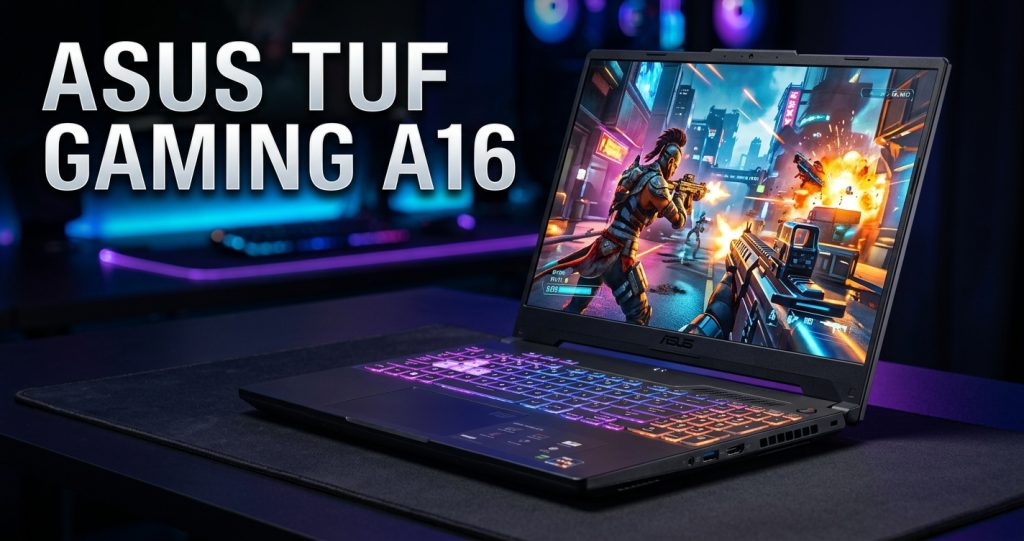
ASUS TUF Gaming A16 Laptop: Powerful Performance for Gaming and Productivity
Introduction to ASUS TUF Gaming A16 Laptop
The ASUS TUF Gaming A16 Laptop is designed for gamers, students, content creators, and professionals who need reliable performance for demanding tasks. ASUS is well known for producing gaming laptops that combine powerful hardware, modern designs, and gaming-focused features. The TUF Gaming A16 series aims to deliver a balanced experience for gaming, multitasking, entertainment, and everyday productivity.
With its gaming-oriented processor options, dedicated graphics on selected configurations, high-refresh-rate display options, and durable TUF design, the ASUS TUF Gaming A16 Laptop is an attractive choice for users looking for a versatile gaming machine.
Whether you enjoy competitive games, explore open-world adventures, edit videos, or work with demanding software, this laptop offers features worth considering. However, specifications and performance can vary depending on the exact model and configuration you choose.
Design and Build Quality
The ASUS TUF Gaming A16 Laptop features a modern design inspired by gaming and military-style aesthetics. Its appearance is generally more understated than some gaming laptops, making it suitable for gaming sessions, classrooms, home offices, and other everyday environments.
The TUF series emphasizes durability, with selected models tested against military-grade durability standards. This design approach helps the laptop withstand certain everyday challenges, although it does not mean the device is waterproof or indestructible.
The keyboard area is designed for comfortable gaming and typing, while the overall construction aims to balance durability and portability. Depending on the specific configuration, the laptop may feature a dark finish, distinctive TUF branding, and subtle gaming-inspired details.
For people who want a gaming laptop that looks professional without losing its gaming identity, the ASUS TUF Gaming A16 is worth exploring.
Display Quality and Gaming Experience
A good display can make a major difference when playing games, watching videos, or editing visual content. The ASUS TUF Gaming A16 Laptop lineup includes models with large displays, often around 16 inches, providing more screen space than many traditional 15-inch laptops.
Depending on the model, display features may include a Full HD+ or higher resolution, a fast refresh rate, and an aspect ratio that provides additional vertical workspace. These features can make games appear smoother and help users manage multiple windows more comfortably.
A high-refresh-rate display is particularly useful in competitive games because it can display more frames per second when the hardware and software support them. This can create a smoother experience in fast-paced titles.
The display can also benefit entertainment and creative work. Watching movies, browsing websites, and editing photographs can feel more comfortable on a larger screen.
Before buying, check the exact panel specifications, brightness, color coverage, resolution, and refresh rate. These details can differ between ASUS TUF Gaming A16 configurations.
Processor Performance
The processor plays an important role in overall laptop performance. It affects application responsiveness, multitasking, game-related calculations, and productivity tasks.
Different generations and configurations of the ASUS TUF Gaming A16 may use different AMD Ryzen processors. The exact processor depends on the model number and release generation.
A capable modern processor can help users run multiple applications, participate in online meetings, browse with numerous tabs, and complete demanding workloads. It can also support gaming performance when paired with a suitable graphics processor.
For students and professionals, strong processor performance can be helpful when working with spreadsheets, presentations, programming tools, and other demanding applications.
Gamers should remember that performance depends on the complete system rather than the processor alone. Graphics hardware, cooling, memory, power settings, and game optimization also influence the final experience.
Graphics Performance for Modern Games
Graphics performance is one of the most important considerations when selecting a gaming laptop. The ASUS TUF Gaming A16 lineup includes configurations with dedicated graphics processors, although the specific GPU varies by model and generation.
A dedicated GPU can provide the graphics processing power required for many modern PC games, 3D applications, video editing, and other visually demanding tasks.
Depending on the hardware, users may be able to enjoy popular competitive games and visually detailed single-player titles at suitable settings. Actual frame rates depend on the game, resolution, graphics settings, cooling conditions, and power configuration.
Some demanding games may require reduced graphics settings to maintain smoother performance. Features such as upscaling and frame generation may also be available on supported hardware and software.
If gaming is your main priority, compare the exact GPU, its power limits, and independent gaming benchmarks before making a purchase. Two laptops with similar product names can offer noticeably different performance.
Memory and Storage Options
Memory and storage are essential for a responsive computing experience. The ASUS TUF Gaming A16 is available in different configurations, with RAM capacity and storage options depending on the particular model.
Adequate RAM helps the laptop manage games, background applications, browser tabs, and creative software. Users who frequently multitask should pay attention to the installed memory and the maximum supported capacity.
Solid-state drive storage can improve boot times, application loading, and game launch speeds compared with traditional hard drives. An SSD also helps make everyday operations feel more responsive.
Storage capacity matters because modern games can require substantial installation space. Users who install several large games, store video projects, or maintain a large media library may benefit from a higher-capacity SSD.
Some configurations may offer upgrade options, but compatibility and accessibility vary. Check the official specifications for the exact model before purchasing additional RAM or storage.
Cooling System and Thermal Performance
Gaming laptops need an effective cooling system to manage heat produced by the processor and graphics hardware. The ASUS TUF Gaming A16 series incorporates model-specific cooling designs intended to maintain performance during demanding workloads.
Cooling performance can affect how consistently a laptop operates during long gaming sessions. A well-managed thermal system helps the hardware maintain suitable operating temperatures while reducing the risk of excessive performance throttling.
However, gaming laptops can become warm and produce noticeable fan noise under heavy workloads. This is normal for many high-performance portable computers.
For the best experience, use the laptop on a hard, flat surface that allows air to circulate through its vents. Avoid blocking the cooling openings with blankets or soft furniture.
Keeping the vents clear and maintaining updated system software can also help support consistent performance.
Keyboard, Touchpad, and Everyday Usability
The keyboard is an important part of the gaming experience, especially for users who play competitive games or spend long hours typing. The ASUS TUF Gaming A16 Laptop features a built-in keyboard designed for both gaming and everyday computer use.
Depending on the configuration, the keyboard may include backlighting that improves visibility in dim environments. Key layout and lighting features should be checked against the specifications of the particular version.
The keyboard can also be useful for writing assignments, preparing documents, programming, and completing office tasks. A responsive keyboard helps make the laptop more versatile than a device intended only for gaming.
The touchpad provides a convenient way to navigate applications when a mouse is unavailable. However, gamers will generally prefer an external gaming mouse for greater control and customization.
Battery Life and Charging
Battery life is another important factor when choosing the ASUS TUF Gaming A16 Laptop. Its actual battery performance depends on the battery capacity, processor, display settings, background applications, and workload.
Light tasks such as document editing, reading, and web browsing generally consume less power than demanding games or rendering applications. Gaming while running on battery can reduce performance and drain the battery much faster.
For intensive gaming, using the included compatible power adapter is usually the best option for achieving the intended performance.
Users who travel with their laptops should consider the power adapter’s size and weight in addition to the laptop itself. It is also sensible to review independent battery tests for the exact configuration you intend to purchase.
<<<visit now<ASUS TUF Gaming A16 Laptop>>
Connectivity and Ports
A gaming laptop should provide enough connectivity for external displays, accessories, networking, and storage devices. The ASUS TUF Gaming A16 series offers a selection of ports that varies by generation and configuration.
Depending on the model, available connections may include USB Type-A, USB Type-C, HDMI, an audio combination jack, and a charging connector. Some configurations may support additional display or data features through USB-C.
These connections can help users attach external monitors, gaming controllers, headsets, keyboards, mice, and external storage drives.
Wireless connectivity also matters for online gaming and everyday use. Supported Wi-Fi and Bluetooth standards depend on the particular model.
Before purchasing, review the official port layout and confirm that it meets your needs. If you plan to connect multiple monitors or specialized equipment, check the supported display outputs and their capabilities.
Audio Quality and Entertainment
The ASUS TUF Gaming A16 Laptop provides built-in audio for everyday entertainment, video calls, and gaming. Internal speakers are convenient for watching videos and listening to general audio without connecting additional equipment.
For competitive gaming, a dedicated gaming headset can provide a more immersive experience and make it easier to hear important in-game sounds. A headset with a microphone is also useful for communicating with teammates.
Students and professionals can use the laptop’s audio hardware for online classes, virtual meetings, and video playback.
Audio quality can vary depending on the model, software settings, and listening environment. Users who prioritize high-quality music playback may prefer external speakers or headphones.
Gaming Performance and Popular Game Types
The ASUS TUF Gaming A16 Laptop is intended for users who want a computer capable of handling gaming alongside everyday tasks. The experience depends heavily on the installed graphics processor and the game’s requirements.
Competitive multiplayer games often benefit from a high-refresh-rate display and consistent frame rates. Less demanding games may run comfortably at higher settings on suitable configurations.
Modern AAA games can place greater demands on graphics memory, processing power, and cooling. Players may need to adjust resolution, texture quality, ray tracing, or other graphics settings to find a suitable balance between visual quality and performance.
The laptop may also suit users who enjoy simulation games, racing titles, role-playing adventures, and strategy games.
Before purchasing, look for benchmark results that match the exact GPU and processor combination. This is more useful than relying on the TUF Gaming A16 name alone.
Content Creation and Productivity
Although the ASUS TUF Gaming A16 Laptop is designed primarily with gaming in mind, its hardware can also make it suitable for selected creative and professional tasks.
Video editors can benefit from a capable processor, dedicated graphics, sufficient RAM, and fast SSD storage. These components can help with editing workflows, previews, effects, and exporting projects, depending on the software and media format.
Graphic designers may appreciate the larger screen and the ability to run creative applications alongside reference material. However, people who require highly accurate colors should examine the display’s color coverage and calibration.
Students can use the laptop for research, presentations, programming, and multitasking. Office users may also benefit from its performance when handling demanding applications.
For professional creative work, check the software’s hardware requirements before buying. A gaming-focused display is not automatically ideal for every color-critical task.
Software and User Experience
The ASUS TUF Gaming A16 Laptop runs Windows on supported configurations, giving users access to a broad range of PC games, productivity software, and creative applications.
ASUS utilities available for compatible models may provide options for managing performance profiles, monitoring system information, adjusting selected settings, and controlling supported lighting features.
Performance modes can help users balance fan noise, power consumption, and speed according to the task. A quieter mode may be suitable for everyday work, while a higher-performance mode may be preferable for demanding games when connected to power.
Users should install compatible driver updates and system updates to maintain security and compatibility. Download drivers and firmware from official ASUS support resources for the exact model.
Pros and Cons of ASUS TUF Gaming A16 Laptop
Pros
- Gaming-focused hardware options for different performance needs.
- Large display with high-refresh-rate options on selected models.
- Dedicated graphics configurations for supported gaming and creative workloads.
- Modern design suitable for gaming, study, and productivity.
- SSD storage for responsive everyday performance.
- Multiple connectivity options, depending on the configuration.
- Potential memory and storage upgrade options on selected versions
>>Visit now << ASUS TUF Gaming A16 Laptop<<