Sony Wireless Headphones for TV: The Ultimate Guide to the Best Wireless TV Listening Experience (2026)
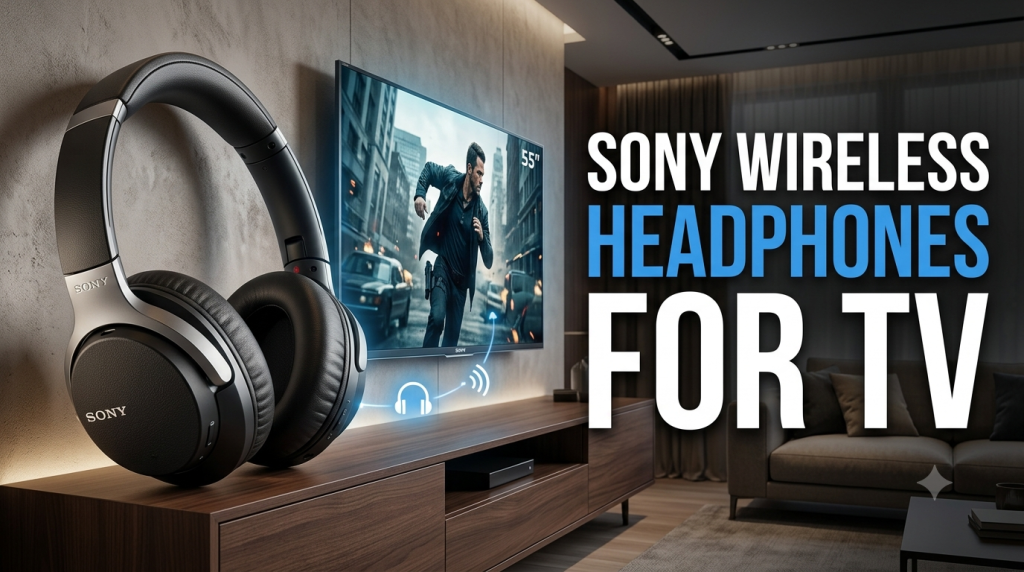
Watching your favorite movies, TV shows, sports, or late-night entertainment becomes much more enjoyable with Sony wireless headphones for TV. Instead of relying on your television’s built-in speakers, Sony headphones provide immersive sound, clear dialogue, deep bass, and private listening without disturbing others.
Whether you’re living with family, sharing an apartment, or simply want a more cinematic experience, Sony wireless headphones are an excellent investment. In this guide, we’ll explore the benefits of using Sony wireless headphones with your TV, the best models to consider, compatibility tips, connection methods, and buying advice.
Why Choose Sony Wireless Headphones for TV?
Sony has earned a reputation as one of the world’s leading audio brands. Their wireless headphones combine premium sound quality, comfortable designs, and advanced Bluetooth technology, making them ideal for television viewing.
Some of the biggest advantages include:
- Crystal-clear dialogue for movies and TV shows
- Powerful bass and immersive surround-like sound
- Comfortable ear cushions for extended viewing sessions
- Active Noise Cancellation (ANC) on selected models
- Long battery life
- Reliable wireless connectivity
- Premium build quality
- Easy Bluetooth pairing
Whether you’re watching Netflix, YouTube, live sports, or gaming, Sony headphones enhance the overall experience.
Benefits of Using Wireless Headphones with Your TV
Wireless headphones offer several practical benefits compared to traditional TV speakers.
Private Listening
One of the biggest advantages is private listening. You can watch TV late at night without disturbing family members or neighbors.
Better Sound Quality
TV speakers often lack depth and clarity. Sony headphones deliver:
- Rich bass
- Clear vocals
- Detailed audio
- Balanced sound profile
This makes movies and dialogue easier to hear.
Freedom to Move
Wireless Bluetooth technology allows you to move around the room without dealing with cables, giving you greater comfort and flexibility.
Reduced Background Noise
Many Sony models include Active Noise Cancellation (ANC), which helps block external distractions so you can focus on your entertainment.
Best Sony Wireless Headphones for TV
Sony WH-1000XM5
The Sony WH-1000XM5 is one of the best wireless headphones available for TV viewing.
Key Features
- Industry-leading Noise Cancellation
- 30-hour battery life
- Multipoint Bluetooth
- Comfortable lightweight design
- Excellent voice clarity
- Premium audio quality
These headphones are ideal for movie lovers who want a cinema-like experience at home.
Sony WH-1000XM4
Although an older model, the WH-1000XM4 remains a popular choice thanks to its impressive sound quality and comfort.
Highlights include:
- Powerful bass
- Adaptive Sound Control
- Touch controls
- Excellent battery life
- Comfortable fit for long viewing sessions
Sony WH-CH720N
If you’re looking for a more affordable option, the WH-CH720N offers excellent value.
Features include:
- Active Noise Cancellation
- Lightweight design
- Long battery life
- Clear dialogue
- Balanced sound
This model is perfect for everyday TV watching.
Sony WH-CH520
The WH-CH520 is an entry-level wireless headphone that delivers reliable performance at a budget-friendly price.
Ideal for:
- Casual viewers
- Students
- Family use
- Everyday entertainment
How to Connect Sony Wireless Headphones to a TV
The connection process depends on your television.
Method 1: Built-in Bluetooth
Many modern Smart TVs include Bluetooth support.
Steps:
- Turn on your Sony headphones.
- Put them into pairing mode.
- Open your TV’s Bluetooth settings.
- Search for available devices.
- Select your Sony headphones.
- Wait for the connection to complete.
Once paired, all TV audio will play through the headphones.
Method 2: Bluetooth Transmitter
If your TV does not support Bluetooth, you can use a Bluetooth transmitter.
Simply:
- Connect the transmitter to the TV’s audio output (3.5 mm, RCA, or optical, depending on the transmitter).
- Pair the transmitter with your Sony headphones.
- Enjoy wireless audio.
This is a simple solution for older televisions.
Method 3: Android TV with Bluetooth
Many Android TVs support Bluetooth natively.
Enable Bluetooth, put your Sony headphones into pairing mode, and connect them through the TV’s Bluetooth menu.
Compatibility
Sony wireless headphones work with many popular TV brands, including:
- Sony BRAVIA
- Samsung Smart TVs
- LG Smart TVs
- TCL TVs
- Hisense TVs
- Philips TVs
- Panasonic TVs
- Android TVs
- Google TV devices
If your TV supports Bluetooth audio, compatibility is generally straightforward.
Features to Consider Before Buying
When choosing Sony wireless headphones for TV, look for these features.
Sound Quality
High-quality drivers produce clearer dialogue, richer music, and more immersive movie soundtracks.
Comfort
Large, soft ear cushions and an adjustable headband make long viewing sessions more enjoyable.
Battery Life
Choose headphones that offer at least 20–30 hours of playback so you don’t need to recharge frequently.
Noise Cancellation
Active Noise Cancellation helps reduce distractions from fans, traffic, or conversations in the room.
Bluetooth Version
Newer Bluetooth versions provide:
- More stable connections
- Better audio quality
- Lower power consumption
- Improved wireless range
Multipoint Connection
Some Sony headphones can stay connected to two devices at once, making it easy to switch between your TV and smartphone.
Tips for the Best TV Listening Experience
To get the most from your Sony headphones:
- Keep the firmware updated using the Sony Headphones Connect app.
- Charge the headphones before long viewing sessions.
- Stay within Bluetooth range for the most stable connection.
- Adjust your TV’s audio settings if you notice any delay.
- Use a quality Bluetooth transmitter if your TV lacks built-in Bluetooth.
Frequently Asked Questions
Can Sony wireless headphones connect to any TV?
They can connect directly to TVs with Bluetooth support. For TVs without Bluetooth, a compatible Bluetooth transmitter is usually required.
Are Sony headphones good for watching movies?
Yes. Sony headphones are known for clear dialogue, balanced sound, and immersive audio that enhance movies and TV shows.
Is there audio delay when using Bluetooth?
Some TVs and headphones support low-latency Bluetooth codecs that help reduce audio delay. If you notice lag, check your TV’s audio settings or consider a low-latency Bluetooth transmitter.
Can I use Sony headphones while someone else watches TV?
In many cases, connecting Bluetooth headphones mutes the TV speakers. Some televisions allow both speakers and Bluetooth headphones to play simultaneously—check your TV’s audio settings to see if this feature is available.
Final Thoughts
Choosing Sony wireless headphones for TV is an excellent way to upgrade your home entertainment experience. Whether you want private listening, better sound quality, or greater comfort during long movie nights, Sony offers reliable options for every budget.
Premium models like the WH-1000XM5 and WH-1000XM4 provide exceptional audio and advanced noise cancellation, while more affordable choices such as the WH-CH720N and WH-CH520 deliver impressive performance at a lower price.
Before purchasing, make sure your TV supports Bluetooth or plan to use a compatible Bluetooth transmitter if needed. With the right setup, you’ll enjoy immersive, high-quality audio that makes every movie, series, and sporting event more engaging.