Samsung Gear 360: Features, Camera Quality, Compatibility, and Buying Guide
Introduction to Samsung Gear 360
The Samsung Gear 360 is a compact 360-degree camera designed to capture photos and videos from multiple directions at the same time. Unlike traditional cameras that record only what is directly in front of the lens, the Samsung Gear 360 can capture a complete panoramic view of its surroundings. This makes it useful for travel photography, outdoor adventures, family events, and virtual reality content.
Samsung introduced the Gear 360 camera for users who wanted to explore immersive photography and video recording. Its compact design makes it easy to carry, while its dual-lens system allows users to create spherical images and videos that viewers can explore from different angles.
Although newer action cameras and smartphones offer advanced recording features, the Samsung Gear 360 remains an interesting option for people who want to learn about 360-degree photography or find a camera for basic immersive content creation.
Buy Now www.amazon.com
Samsung Gear 360 Design and Build Quality
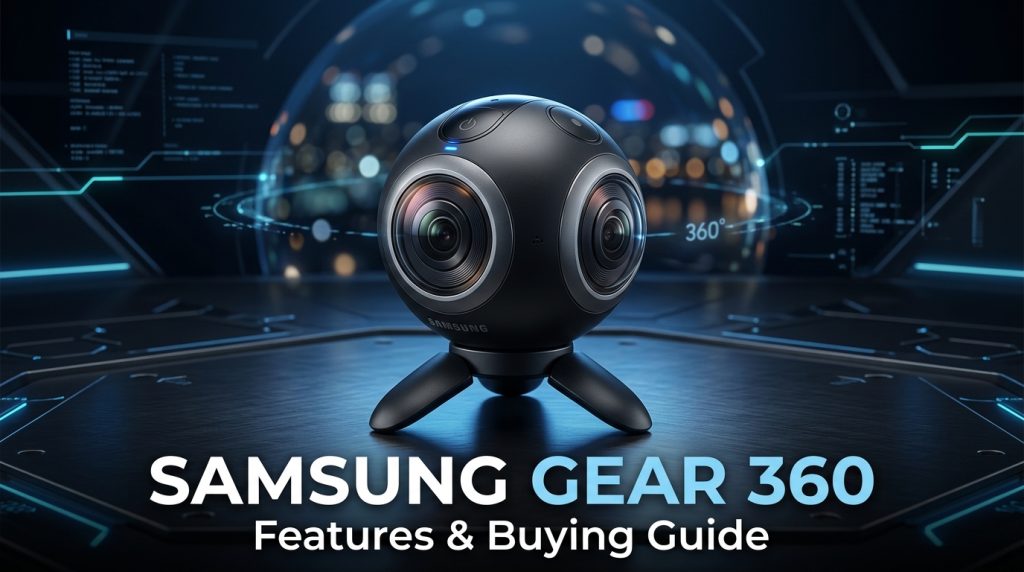
One of the most recognizable features of the Samsung Gear 360 is its small, rounded design. The camera is designed to be portable, allowing users to carry it in a bag or backpack without taking up much space.
Depending on the model, the device includes two fisheye lenses positioned on opposite sides of the camera. These lenses capture different views of the surrounding environment, which can then be combined into a single 360-degree image or video.
The camera also includes physical controls and a small display on supported models. These controls help users navigate settings, select recording modes, and start or stop recording without always needing a smartphone.
Its lightweight construction makes the camera suitable for travel and outdoor activities. However, users should check the specific model’s durability and water-resistance rating before using it in rainy conditions or near water.
Samsung Gear 360 Camera Quality
Camera quality is one of the most important considerations when choosing a 360-degree camera. The Samsung Gear 360 was designed to capture immersive content by recording views from multiple directions simultaneously.
The original Samsung Gear 360, released in 2016, features two 15-megapixel fisheye cameras and supports 4K 360-degree video recording. The 2017 version introduced a more compact design and supports 4K recording as well, with differences in camera specifications and supported recording modes.
The dual-lens setup allows users to capture landscapes, buildings, indoor environments, and group activities in a spherical format. The final result can be viewed by moving a phone, dragging across a screen, or using compatible virtual reality viewing software.
However, image quality depends on lighting, camera settings, movement, and the processing software used. Like many compact cameras, the Gear 360 may produce less detailed results in low-light environments compared with newer cameras.
Key Features of Samsung Gear 360
1. 360-Degree Photo Capture
The Samsung Gear 360 allows users to capture photographs that show the environment in every direction. Instead of taking several separate pictures, users can create a spherical image that viewers can explore interactively.
This feature is useful for travel photography, property presentations, sightseeing, and documenting special occasions.
2. 4K Video Recording
Supported Gear 360 models can record 360-degree videos in 4K resolution. This allows users to capture immersive footage with a broad view of their surroundings.
The final viewing experience depends on the playback device and how the video is processed. Because the image covers a full sphere, the visible detail in any individual direction can appear lower than that of a conventional flat 4K video.
3. Dual-Lens Camera System
The camera uses two fisheye lenses to record different parts of the surrounding scene. Compatible software combines these recordings into a spherical image or video.
This system makes it possible to capture a complete environment without manually turning the camera to record each direction.
4. Compact and Portable Design
The Gear 360 is small enough to carry during everyday activities and travel. Its portable design makes it convenient for users who want to experiment with 360-degree content without carrying a large camera system.
5. Smartphone Connectivity
Compatible Samsung Gear 360 models can connect to supported smartphones for camera control, previewing, and transferring content. However, compatibility varies according to the camera model, phone, operating system, and software version.
Buyers should check compatibility before purchasing a used camera, especially if they use a newer Android phone or an iPhone.
6. Multiple Recording Modes
Depending on the model, the Gear 360 offers different recording and photography options. These may include standard 360-degree video, photographs, time-lapse recording, and other supported modes.
Available features vary between generations, so checking the official specifications for the exact model is important.
Samsung Gear 360 Compatibility
Compatibility is an important factor when buying the Samsung Gear 360. The camera was originally designed around the smartphones and software available when it was released.
Some older Samsung Galaxy devices have better support for Gear 360 functions than newer smartphones. Support for other Android devices and iPhones varies by model and software version.
Users may also encounter limitations when installing older companion applications on recent operating systems. Therefore, a camera that works with one phone may not offer the same features with another device.
Before buying, check the following:
- Your smartphone’s operating system and model.
- Whether the required Gear 360 application is still available.
- Whether your phone supports camera control and content transfer.
- Whether compatible desktop software is available for stitching or editing footage.
- Whether the camera can save recordings to its memory card without a smartphone.
If you plan to buy a used unit, ask the seller to demonstrate recording and file transfer before completing the purchase.
How to Use the Samsung Gear 360
Using the Samsung Gear 360 is relatively straightforward once the camera has been configured.
First, charge the battery and insert a compatible memory card if required. Check that the card has enough free space for photos and videos.
Next, turn on the camera and select the desired recording mode using the physical controls. If your smartphone supports the camera, install the appropriate compatible application and follow the available connection instructions.
Place the camera on a stable surface or use a suitable tripod. Since both lenses capture the surrounding environment, remember that the camera records in multiple directions, including areas behind it.
Start recording and avoid moving the camera unnecessarily if you want smoother footage. After recording, transfer the files to a compatible device and use supported software to process or view the spherical content.
For the best results, clean both lenses before recording and avoid placing fingers near the lens areas.
Benefits of Samsung Gear 360
The Samsung Gear 360 offers several benefits for users interested in immersive photography.
Portable size: Its compact body makes it convenient for travel and outdoor activities.
Immersive recording: The camera captures a broad spherical view rather than a single forward-facing angle.
Creative possibilities: Users can create interactive travel videos, virtual tours, and unusual social media content.
Dedicated camera controls: Supported models allow users to operate the camera directly without relying entirely on a smartphone.
Learning opportunity: It can help beginners understand 360-degree photography, spherical video, and immersive media production.
However, these benefits should be considered alongside the camera’s age, software compatibility, battery condition, and limitations in image quality.
Buy Now www.amazon.com
Limitations of Samsung Gear 360
Although the Gear 360 introduced useful features for its time, it has several limitations compared with modern cameras.
First, it is an older product, and software support may be limited on newer phones and computers. Finding compatible applications or editing tools may require additional research.
Second, low-light performance can be limited, especially when recording indoors at night. Good lighting generally produces better results.
Third, the camera’s battery may have degraded if the device has been stored or used for many years. Replacement batteries and accessories may also be difficult to find.
Finally, the stitching process can sometimes produce visible lines or distortions where the two lens images meet. Camera placement, nearby objects, and software processing can affect the final result.
Understanding these limitations can help buyers decide whether this camera suits their needs.
Is Samsung Gear 360 Worth Buying?
Whether the Samsung Gear 360 is worth buying depends on your budget and intended use. It may be suitable for someone who wants to experiment with 360-degree photography without purchasing an expensive modern camera.
A used unit can be worth considering if it is in good condition, records properly, includes a working battery, and is compatible with your devices.
Before buying, test both lenses, inspect the camera body, check the memory card slot, and record a short video. Review the resulting footage to confirm that the images stitch correctly.
Also compare the price of a used Gear 360 with newer 360-degree cameras. Newer models may offer better stabilization, image quality, battery performance, and software support.
If your main purpose is ordinary photography or high-quality vlogging, a modern smartphone or dedicated video camera may be more practical. If you specifically want spherical images and immersive video, the Gear 360 can still be an interesting entry point.
Samsung Gear 360 Buying Guide
Before purchasing a Samsung Gear 360, consider these important factors.
Camera condition: Inspect the lenses for scratches, dust, and damage. Lens defects can significantly affect image quality.
Battery health: Ask how long the camera operates after a full charge. An older battery may need replacement.
Memory card support: Confirm that you have a compatible memory card with sufficient storage capacity.
Smartphone compatibility: Verify that your phone supports the camera’s required software and connection features.
Included accessories: Check whether the package includes a charging cable, tripod, carrying case, or other useful accessories.
Price comparison: Compare several listings and consider the camera’s condition, included accessories, and overall functionality rather than choosing solely by price.
Buying carefully can help you avoid spending money on a device that does not work with your existing equipment.
Frequently Asked Questions (FAQs)
What is the Samsung Gear 360 used for?
The Samsung Gear 360 is used to capture 360-degree photos and videos. It can be useful for travel content, virtual tours, family events, and creative video projects.
Does the Samsung Gear 360 record in 4K?
Yes. Supported Samsung Gear 360 models offer 4K 360-degree video recording. Recording options and specifications differ between generations.
Can I use Samsung Gear 360 with any smartphone?
No. Compatibility depends on the Gear 360 model, smartphone, operating system, and available software. Check compatibility before purchasing.
Is Samsung Gear 360 good for beginners?
It can be useful for beginners who want to explore immersive photography. However, older software requirements and limited support on newer devices may make setup challenging.
Can Samsung Gear 360 take normal photos?
Its primary purpose is 360-degree photography and video. The available photo formats and recording modes depend on the model.
Should I buy a used Samsung Gear 360?
A used unit may be worth considering if the camera, battery, lenses, and memory card slot work properly and the device is compatible with your phone or computer.
Conclusion
The Samsung Gear 360 is a compact camera that helped make 360-degree photography and video more accessible to everyday users. Its dual-lens design, spherical photo capture, and supported 4K recording make it an interesting device for travel enthusiasts and beginners exploring immersive media.
However, buyers should consider its age, battery condition, software availability, and smartphone compatibility before purchasing one. Comparing it with newer cameras can also help determine whether it meets your expectations.
For anyone interested in learning about 360-degree cameras, the Samsung Gear 360 remains a useful product to explore. With the right setup and realistic expectations, it can still provide an enjoyable way to capture and share immersive experiences.
Buy Now www.amazon.com