Samsung Galaxy Tab S10 FE 5G: Features, Performance, and Buying Guide
Introduction
The Samsung Galaxy Tab S10 FE 5G is a versatile tablet designed for students, professionals, content creators, and everyday users who want a reliable device for work, entertainment, and communication. With its large display, S Pen support, 5G connectivity, and useful productivity features, this tablet offers a convenient way to study, browse the internet, watch videos, and complete everyday tasks.
Samsung’s Galaxy Tab FE series focuses on delivering useful features at a more accessible price than its premium flagship tablets. The Galaxy Tab S10 FE 5G combines a modern design with software features that make it suitable for both personal and professional use.
In this guide, we will explore the design, display, performance, battery life, cameras, connectivity, software, and other important features of the Samsung Galaxy Tab S10 FE 5G.
1. Samsung Galaxy Tab S10 FE 5G Design
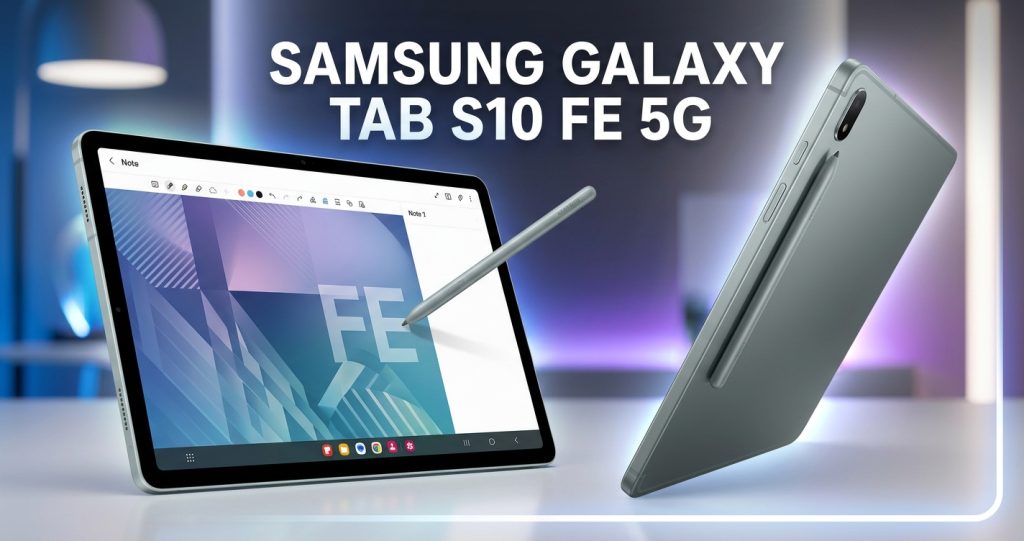
The Samsung Galaxy Tab S10 FE 5G features a modern and practical design that is easy to carry between home, school, and work. Its slim profile makes it suitable for users who need a portable device for everyday activities.
The tablet has a clean appearance with a metal-style construction and carefully designed edges. Its simple design gives it a professional look without unnecessary decorative elements.
The device is suitable for reading documents, taking notes, browsing websites, and watching videos while travelling. Users can also pair it with a compatible keyboard cover to create a more laptop-like working experience.
Samsung offers different color options depending on the market and configuration. Buyers should check the available colors and storage variants before placing an order.
2. Display and Visual Experience
One of the most important features of the Samsung Galaxy Tab S10 FE 5G is its large display. It features a 10.9-inch LCD screen with a resolution of 2304 × 1440 pixels and a refresh rate of up to 90Hz.
The display provides a spacious viewing area for reading, online classes, watching movies, and working with documents. Its high resolution helps text appear clear and makes everyday browsing more comfortable.
The 90Hz refresh rate can make scrolling through websites, menus, and compatible applications feel smoother than a standard 60Hz display.
Although this is an LCD panel rather than an AMOLED screen, it remains suitable for general entertainment and productivity. Users who primarily watch movies or edit visual content should consider their display preferences before purchasing.
The large screen also makes split-screen multitasking more convenient. You can view a document while taking notes or keep a video lesson open alongside a note-taking application.
3. Performance and Processor
The Samsung Galaxy Tab S10 FE 5G is powered by Samsung’s Exynos 1580 processor. This chipset is designed to handle everyday applications, productivity tasks, web browsing, and entertainment.
For students, the tablet can support online learning platforms, digital textbooks, note-taking applications, and video meetings. Professionals can use it to review documents, manage emails, and work with compatible office applications.
The tablet is also suitable for casual gaming. Popular mobile games can provide an enjoyable experience, although performance depends on the game’s graphics requirements and selected settings.
Users should not expect it to replace a high-performance gaming computer or a specialized workstation. Demanding games and professional editing applications may require compromises in graphics settings or workflow.
Overall, the processor provides a practical foundation for everyday tablet use, especially for people who want one device for studying, browsing, communication, and entertainment.
4. RAM and Storage Options
Memory and storage are important when choosing a tablet because they affect multitasking and the amount of content you can keep on the device.
The Samsung Galaxy Tab S10 FE 5G is available in configurations that include 8GB or 12GB of RAM, depending on the market and model. Storage options include 128GB and 256GB.
The 8GB RAM configuration is suitable for typical everyday activities, including browsing, messaging, streaming, and document editing. The 12GB configuration can provide additional flexibility for users who regularly switch between multiple applications.
Storage space is useful for saving downloaded videos, photographs, study materials, games, and work documents. The tablet also supports expandable storage through a microSD card, allowing users to keep more files without relying entirely on internal storage.
Actual storage capacity available to the user will be lower than the advertised capacity because the operating system and preinstalled applications occupy some space.
Before buying, check the exact RAM, internal storage, and cellular model offered by the retailer.
5. 5G Connectivity and Internet Access
The 5G feature is one of the main reasons to consider the Samsung Galaxy Tab S10 FE 5G instead of a Wi-Fi-only tablet.
With a compatible SIM or supported cellular setup and an available 5G network, users can connect to the internet when they are away from home or the office. This is useful for commuters, travellers, students, and professionals who frequently work outside.
You can use mobile data to attend online meetings, download documents, access cloud storage, and browse websites without depending on public Wi-Fi.
The tablet also supports Wi-Fi and Bluetooth connectivity for wireless internet access and compatible accessories.
However, 5G performance depends on network coverage, the carrier, the supported frequency bands, and the mobile plan. A 5G tablet will not automatically provide 5G speeds in areas where the network is unavailable.
Buyers should verify regional network compatibility and SIM requirements before purchasing the device.
>>>Samsung Galaxy Tab S10 FE 5G<<<
6. S Pen Support for Notes and Drawing
S Pen support is a major advantage of the Samsung Galaxy Tab S10 FE 5G. It allows users to write, draw, annotate documents, and interact with compatible applications more naturally than using a finger alone.
Students can use the S Pen to take handwritten notes during online classes, highlight important information, and organize study materials. Teachers can annotate educational documents, while professionals can mark up PDFs and review presentations.
Creative users can also use compatible drawing applications to sketch illustrations, create rough designs, and practice digital art.
The S Pen is particularly useful when combined with the tablet’s large display. It provides a practical alternative to carrying separate notebooks for many everyday activities.
The tablet is not necessarily a replacement for specialized drawing equipment, but it can be an excellent starting point for students and casual artists.
Check the product listing to confirm which S Pen accessories are included in the specific package.
7. Battery Life and Charging
Battery life is an important consideration for people who use their tablets throughout the day.
The Samsung Galaxy Tab S10 FE 5G includes an 8,000mAh battery designed to support activities such as web browsing, video playback, online learning, and document editing.
Actual battery life depends on several factors, including screen brightness, mobile network strength, gaming activity, background applications, and the amount of time spent streaming videos.
For example, reading documents and taking notes may use less power than playing demanding games or maintaining a mobile data connection throughout the day.
The tablet supports up to 45W wired charging with a compatible charger. Charging speed can vary according to the charger, cable, temperature, and current battery level. A compatible charging adapter may need to be purchased separately.
For the best experience, users should select a reputable, compatible charger and follow Samsung’s charging recommendations.
8. Camera Quality and Video Calls
The Samsung Galaxy Tab S10 FE 5G includes a 13MP rear camera and a 12MP ultrawide front camera.
The rear camera is useful for capturing documents, taking quick photographs, scanning notes, and recording everyday moments. While a tablet camera can be convenient, it is not intended to replace a dedicated camera or a smartphone designed specifically for photography.
The front-facing ultrawide camera is particularly useful for video calls and online meetings. Its wider field of view can help accommodate multiple people or show more of the surrounding area during a call.
Students can use the front camera for remote classes, while professionals can use it for virtual meetings and collaborative work.
Video quality depends on lighting, network conditions, application settings, and the conferencing platform. Good lighting and a stable internet connection can improve the overall calling experience.
9. Software and Productivity Features
The Samsung Galaxy Tab S10 FE 5G runs Android with Samsung’s One UI interface. The exact software version and available updates depend on the device’s release configuration and region.
Samsung’s tablet software provides features that support multitasking, personalization, and productivity.
Users can organize their home screen, manage notifications, install compatible applications, and adjust settings to suit their needs.
Samsung Notes can help users create handwritten or typed notes, while compatible office applications support document editing and file management.
Multitasking features allow users to work with more than one application on the screen, depending on application compatibility and software settings. This is helpful when researching a topic, writing an assignment, or checking information while attending an online class.
Samsung also announced seven generations of Android OS upgrades and seven years of security updates for the Galaxy Tab S10 FE series. Buyers should confirm the applicable regional support policy and the remaining update period for the model they purchase.
10. Entertainment and Gaming Experience
The Samsung Galaxy Tab S10 FE 5G is suitable for watching movies, streaming television shows, viewing online videos, and listening to music.
Its 10.9-inch display provides more viewing space than a typical smartphone, making it comfortable for longer video sessions. The stereo speaker system supports everyday entertainment without requiring external speakers.
Users can install compatible streaming services, music applications, and games through supported app stores.
Casual games and many mainstream mobile titles should be suitable for the tablet. More demanding games may require lower graphics settings to maintain consistent performance.
For a better gaming experience, users can connect compatible Bluetooth controllers and headphones. They should also remember that gaming over mobile data can consume substantial amounts of data, depending on the title and connection.
The tablet is therefore a versatile option for people who want one device for both productivity and relaxation.
11. Is the Samsung Galaxy Tab S10 FE 5G Good for Students?
The Samsung Galaxy Tab S10 FE 5G can be a useful choice for students who need a portable device for education.
Its large display is suitable for reading digital textbooks, reviewing presentations, and watching recorded lectures. S Pen support makes handwritten notes and document annotations more convenient.
Students can use the tablet to organize assignments, participate in video meetings, and access educational websites. Expandable storage can also be helpful for maintaining a library of downloaded learning materials.
The 5G connection is valuable when reliable Wi-Fi is not available, provided cellular coverage and a suitable data plan are available.
However, students who need desktop-only software, advanced programming environments, or extensive professional video-editing tools may still require a laptop or desktop computer.
For everyday educational activities, the tablet offers a balanced combination of portability, connectivity, and productivity features.
12. Can You Use the Tablet for Work?
The Samsung Galaxy Tab S10 FE 5G can handle a range of office and business tasks.
It is suitable for email, web research, document review, online meetings, presentations, and cloud-based collaboration. A compatible keyboard and mouse can make typing and navigating applications more convenient.
Professionals who travel frequently may appreciate the ability to access documents through mobile data rather than relying exclusively on Wi-Fi.
The tablet can also work well as a secondary device alongside a desktop computer. For example, you can use it to read reference materials, attend meetings, or take notes while working on another device.
Nevertheless, compatibility should be checked before relying on it for specialized business applications. Some desktop programs and advanced workflows may not be available in equivalent Android versions.
13. Durability and Water Resistance
The Samsung Galaxy Tab S10 FE series features an IP68 rating for dust and water resistance under specified laboratory conditions.
This rating provides additional protection against dust and certain water-exposure situations compared with tablets without an official ingress-protection rating.
However, water resistance does not mean the tablet is indestructible or suitable for every environment. Protection can diminish through ordinary wear, accidental damage, or repairs.
Avoid intentionally exposing the device to liquids, and follow Samsung’s care and cleaning instructions. A protective case can also help reduce the risk of scratches and damage from accidental drops.
Users who carry their tablet to school, work, or outdoor locations may find a suitable case and screen protector worthwhile accessories.
14. Samsung Galaxy Tab S10 FE 5G Price and Value
The price of the Samsung Galaxy Tab S10 FE 5G depends on the country, retailer, storage configuration, cellular compatibility, and current promotions.
The 5G version may cost more than the Wi-Fi-only model because of its cellular connectivity. Higher-storage configurations can also carry a higher price.
When comparing offers, consider the complete cost of ownership rather than looking only at the advertised tablet price. Accessories such as a keyboard cover, protective case, screen protector, and compatible charging adapter may increase the total expense.
It is also worth comparing the tablet with alternatives in the same price range. Consider display quality, processor performance, software support, included accessories, and the importance of S Pen functionality.
The Galaxy Tab S10 FE 5G is most attractive to buyers who will make regular use of its pen support, large display, expandable storage, and mobile connectivity.
15. Pros and Cons
Pros
- Large 10.9-inch display with a 90Hz refresh rate.
- S Pen support for notes, annotations, and drawing.
- 5G connectivity for mobile internet access.
- Exynos 1580 processor for everyday productivity.
- Expandable storage through a microSD card.
- 8,000mAh battery with support for up to 45W wired charging.
- Front ultrawide camera for video calls.
- IP68-rated dust and water resistance.
- Long-term software support announced for the series.
Cons
- LCD display instead of an AMOLED panel.
- Demanding games may require reduced graphics settings.
- Some accessories and the charging adapter may cost extra.
- Mobile data requires a compatible network and plan.
- It cannot replace a full desktop computer for every professional workflow.
- Price and configuration availability vary by market.
16. Who Should Buy the Samsung Galaxy Tab S10 FE 5G?
This tablet is a good option for people who want a flexible device for education, entertainment, and everyday productivity.
Students can benefit from its S Pen support and large screen. Professionals can use it for documents, meetings, and travel. Families can use it for streaming, browsing, and educational applications.
Digital artists and casual creators may appreciate the ability to draw and annotate directly on the screen. People who frequently work away from Wi-Fi may also benefit from its cellular connectivity.
On the other hand, buyers who prioritize an AMOLED display, high-end gaming performance, or professional desktop software should compare alternative devices before deciding.
Choosing the correct tablet depends on your budget, the applications you use, and the features that matter most in your daily routine.
Conclusion
The Samsung Galaxy Tab S10 FE 5G is a versatile Android tablet that combines a 10.9-inch display, S Pen support, a capable processor, expandable storage, and mobile connectivity.
Its features make it suitable for students, professionals, casual gamers, and users who want a portable device for entertainment and productivity. The 5G connection is particularly useful for people who need internet access outside traditional Wi-Fi environments.
Although its LCD display and performance limits may not satisfy every premium-device buyer, the tablet offers a practical set of features for everyday use.
Before purchasing, compare local prices, verify the exact memory and storage configuration, and confirm that the cellular model supports your network. If you value note-taking, portability, and mobile internet access, the Samsung Galaxy Tab S10 FE 5G deserves consideration.
Samsung Galaxy Tab S10 FE 5G